Dr Richard Edwards, University of New South Wales
Thursday 10th December 2015
Session outline
Click for slides.
Part I: Theory
- Introduction to workshop
- What are SLiMs?
- What is SLiMSuite
Part II: Practice
- Installing/running SLiMSuite
- Data types and main input formats
- Motif discovery using the SLiMSuite REST Servers
- Motif discovery using the SLiMScape app for Cytoscape
Additional help and documentation
General information about SLiMs and motif discovery can be found in the literature. Some good places to start are the recent ELM 2016 paper and our 2015 Methods in Molecular Biology review as well as the SLiMScape app paper:
- Motif discovery review paper (PDF)
- SLiMScape app paper (PDF)
- SLiMFinder manual (PDF)
- SLiMProb manual (PDF)
- CompariMotif manual (PDF)
For information about SLiMSuite, please visit the EdwardsLab webpage and the SLiMSuite blog. Help and documentation for the REST servers can also be found at the REST homepage. If in doubt, please email: richard.edwards@unsw.edu.au.
Several EdwardsLab publications also cover motifs and SLiMSuite tools.
Installing/Running SLiMSuite
NOTE: For this workshop, you do not need to install SLiMSuite. You will need Cytoscape and the SLiMScape app for the later parts.


The current SLiMSuite release is 2015-11-30 and can be downloaded by clicking the button (left).
In addition to the tarball available via the links above, SLiMSuite is now available as a GitHub repository (right).
See also: Installation and Setup.
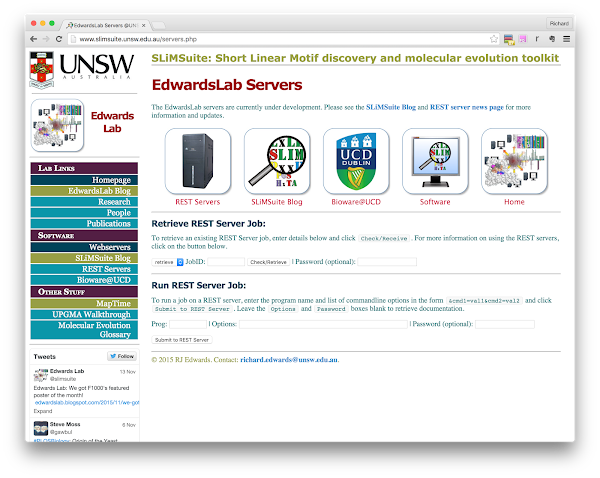
For this workshop, we will primarily be running the tools (and looking at pre-generated results) via the online servers:
Data types and main input formats
From a computer science perspective, input and output for SLiMSuite is just plain ASCII text. This makes it easy to plug SLiMSuite into existing scripts and pipelines - and manually view/edit any input or output files if required. However, “plain text” is not very informative, and SLiMSuite actually deals with a lot of different formats of plain text (from a “human formatting” rather than “file type” point of view). The documentation is currently in the process of being updated to better reflect these formats but some commandline options will still simply list FILE, FILES or FILELIST as input parameters: see the accompanying descriptions to see what format these should be. Ask if it’s not clear! (File format documentation will also be added to the SLiMSuite blog, so check there.)
Within SLiMSuite, each file type has a distinct “file extension” that denotes the file type. Note that these are not enforced for input, although some programs may not always recognise the right format if a different extension is used. If you get odd input behaviour/errors that you do not understand, see if changing the file extensions helps. If you want a common file extension to be auto-recognised, let me know and I might be able to add it. SLiMSuite file extensions will not necessarily be recognised by other programs. NOTE: Operating systems will sometimes hide file extensions by default. If you are getting very confused, or have problems of extra *.txt extensions on everything, try changing the system settings. (And/or becoming familiar with command-line file manipulation.)
The main input formats for SLiM discovery are:
- A source of protein sequence data. This could be a protein FASTA file, a Uniprot plain text file, or a list of Uniprot accession numbers to download. For some tools, a single Uniprot accession number will work.
- A source of motif (regular expression) definitions. This is only required if looking for known (or other pre-defined) motifs and/or wanting to compare a set of de novo predictions with known motifs. A number of different formats are accepted for motif input, including SLiMFinder (summary) results and ELM downloads. The simplest/easiest is a plain text file of regular expressions. For more on motif regular expression formats, please see Edwards and Palopoli 2015.
Common motif discovery tasks
Jobs can be run and retrieved at: http://www.slimsuite.unsw.edu.au/servers.php. (This is a bit easier than making the URL directly, although this is also an option as we will see.)
NOTE: Some of the jobs take a while to run and the SLiMSuite servers have limited resources. It would therefore be useful if you could click on the example JobID links rather than trying to run every example REST command yourself. The first output tab (and the log tab) will show you the run times for that job, so you can see which jobs are fast or slow before you experiment.
Task 1: Find known SLiMs in a protein (ELM/SLiMProb)
ELM. Visit http://http://www.elm.eu.org/ and enter your protein of choice as Uniprot identifier or accession number in the box. (Identifiers will auto-complete and fill in some extra details.) For non-Uniprot protein sequences, you can also enter fasta format.
Try this now with P03070 (LT_SV40) or P03254 (E1A_ADE02). Each of them should have a True Positive LIG_Rb_LxCxE_1 motif.
SLiMProb. We can do a similar search using the SLiMProb REST server (paste the contents of the grey box onto the end of the http://rest.slimsuite.unsw.edu.au/ URL):
slimprob&uniprotid=E1A_ADE02&motifs=elm
JobID: 15120800029
NOTE: The ELM alias currently searches the 2015 ELM classes.
Task 2: Find custom SLiMS in a protein (SLiMProb)
slimprob&uniprotid=E1A_ADE02&motifs=LxCxE,PxDLS
JobID: 15120800031
Task 3: Finding proteome-wide occurrence of a motif using Bioware (SLiMSearch)
The SLiMSearch server is accessible at: http://slim.ucd.ie/slimsearch/. This has been recently updated to Version 4 and now brings in a lot of information, so it is recommended that you read the Help pages for the server.
Example (LIG_CtBP_PxDLS_1): http://slim.ucd.ie/rest/#/slimsearch/annotations?jobId=7R8Tvssm9HEdjWW7jQsgEHUfP0VlHdR6
Human protein PRDM16 is particularly interesting: it does not have an annotated ELM but does match a region annotated to interact with CTBP1. (See the Region column - Expand the instance Feature annotations for a clearer look.) This kind of search can be a good way of identifying new instances of known motifs - some of which may be in the literature but may not have yet made it into database annotation.
The ELM definition for this motif P[LVIPME][DENS][LM][VASTRG] is very degenerate with a lot of hits - over-prediction is a big problem in motif discovery. We can try to make the definition a little tighter as the expense of some instances, using another tool called SLiMMaker:
slimmaker&peptides=LIG_CtBP_PxDLS_1&iterate=T&align=F&minfreq=0.67&minseq=2
JobID: 15120600004
Repeating the SLiMSearch analysis with the redefined motif (P[EILMV][DN]L[ARST]) gives a greater density of known ELMs (see the Motif column) in the top ranked motifs: http://slim.ucd.ie/rest/#/slimsearch/annotations?jobId=L41BRpXQ1oTD6ByDuUSqjWbQZ22WBKbw.
Task 4: Predicting novel SLiMs de novo in a set of proteins (SLiMFinder)
SLiMFinder is designed to look for convergently evolved motifs that are shared between unrelated proteins. For example, we can look at the proteins known (in ELM) to contain the LIG_PCNA_PIPBox_1. As SLiMs are generally in disordered regions, we will switch disorder masking on with dismask=T, which uses IUPred to predict globular regions, which are masked out:
slimfinder&uniprotid=LIG_PCNA_PIPBox_1&dismask=T
JobID: 15120800001
(We will look at the UPC and motif cloud output among others.)
Task 5: Identifying known motifs from de novo predictions (CompariMotif)
When you have a lot of motif predictions, it can be tiresome and error-prone to manually scan them for things that look familiar. SLiMSuite has a tool called CompariMotif, which compares sets of motifs for similarity.
The comparimotif server can take motif files/lists (like SLiMProb or SLiMFinder output directly. These are given to the &motifs and/or &searchdb options: if no &searchdb is given then the input motifs are searched against themselves. (This can be useful if clouding goes a bit wrong.)
To pass the output of one server to another, use the format: &cmd=jobid:XXXXXX:OUTFMT, where XXXXXX is the Job ID and OUTFMT is the desired output format. E.g.:
comparimotif&motifs=jobid:15120800001:main&searchdb=LIG_PCNA_PIPBox_1
JobID: 15120900004
The server is currently in development so output is not sorted usefully yet. This is more of a problem if searching against many SLiMs:
comparimotif&motifs=jobid:15120800001:main&searchdb=elm
JobID: 15120900005
The best advice is to save the compare output table (retrieve&jobid=15120900005&outfmt=compare), open it up in Excel and sort on Score. Alternatively, use the CompariMotif server at http://bioware.ucd.ie.
Task 6: SLiM prediction with conservation masking (SLiMFinder)
Masking is important as it reduces the search space. It can also reduce the signal if it incorrectly masks some true positives but for larger datasets the reduction in "noise" can be more important. As well as dismask=T/F there are several other masking options in SLiMSuite:
- low complexity masking (
ONby default) - N-terminal methionines (
ONby default) - conservation-based masking (
OFFby default) - Uniprot feature masking (
OFFby default) - Motif masking (
OFFby default)
For custom sequence input, there is also the option for custom masking based on upper/lower case. For now, we will just look at conservation masking, as this has been shown to improve sensitivity in PPI data. For example, a 2013 compilation of CTBP1 interactors does not yield a significant motif:
slimfinder&uniprotid=CTBP1&dismask=T&runid=CtBP1-DisMask
JobID: 15120900002
But if consmask=T is also switched on:
slimfinder&uniprotid=CTBP1&dismask=T&consmask=T&runid=CtBP1-ConsMask
JobID: 15120900003
The importance of correcting for evolutionary relationships
The UPC correction can be switched off with efilter=F. Many motif prediction tools calculate estimated expectations without such correction. This can result is massive biases due to shared evolutionary history, which swamp any convergent SLiM evolution signal, for example with the LIG_CtBP_PxDLS_1 ELM proteins:
slimfinder&uniprotid=LIG_CtBP_PxDLS_1&dismask=T&runid=CtBP-NoEFilter&efilter=F
JobID: 15120800036
Task 7: Look for enrichment or depletion of motifs in a set of proteins (SLiMProb)
We can investigate why the PxDLS motif did not come back with just disorder masking by looking at its enrichment using SLiMProb. When given multiple proteins, SLiMProb will use the same UPC correction as SLiMFinder but also return statistics without UPC correction and simply treating all the sequences as one giant sequence. It can, for example, be used to investigate different definitions of a motif:
slimprob&uniprotid=CTBP1&dismask=T&runid=CtBP1-DisMask&motifs=PxDLS,P[LVIPME][DENS][LM][VASTRG],Px[DE][LM][ST]
JobID: 15120900016
In this case, we can see that even though the "true" motif has the most support, it is also expected to occur more by chance. It is enriched, but not enough to survive the multiple testing correction of SLiMChance.
Though not of interest here, the pUnd statistics can be used to look for depletion/avoidance of a particular motif in a dataset.
Task 8: Find novel motifs from a conservation pattern (SLiMPrints)
Patterns of evolutionary conservation can also be used to directly identify regions of proteins that look like motifs. The tool we have developed for this is called SLiMPrints, which can be run at the Bioware SLiMPrints server. For example, we can look for motif-like regions in one of the CtBP PPI partners, FOG1_HUMAN (Q8IX07): http://bioware.ucd.ie/~compass/biowareweb/cgi-bin/PHP_helper_files/slimprintsInfo.php?jobId=e7GZLf
This protein has a bunch of significant motif-like regions, including the PxDLS motif region at rank 7: http://bioware.ucd.ie/~proviz/ProViz/alignmentViewer/drawer.php?uniprotid=Q8IX07&slim=GPIDL&slimpos=793&column=794.5&width=80&collapse=false
(Note how the precise motif is rarely returned by de novo predictors.)
Task 9: Using the SLiMScape app to visualise a server job
We're now going to fire up Cytoscape and have a quick look at the SLiMScape app. This is fairly well described in the paper, so we will just look at the main ways to run the server. If you've not used Cytoscape before, you'll want to visit the Cytoscape website and watch the introduction video, before installing it.
The simplest is to retrieve an existing run:
- In the SLiMFinder tab, enter
15120900003in the Run ID box and hit Retrieve. - Apply the default layout.
- Explore the results. Connections are UPC relationships in the data.
Task 10: Running QSLiMFinder through SLiMScape
Now let's imagine we had seen the SLiMPrints results from above for FOG1_HUMAN and knew that it interacted with CtBP1. We could ask the specific question if any motifs in FOG1_HUMAN were enriched in the rest of the PPI dataset. We do this by using QSLiMFinder and giving Q8IX07 as the query. (&query=Q8IX07 on the server.)
First, add a node to the network and change its name to Q8IX07. Enter this in the Query Sequence box then highlight all of the nodes before hitting Run QSLiMFinder:
JobID: 15120900007
This is the essence of molecular mimicry and we could use the same approach to see if E1A_ADE02 shares any motifs by adding P03254 and using it as a query:
JobID: 15120900008
Task 11: Building PPI networks for analysis
The most useful thing of having access to SLiMSuite through Cytoscape is to be able to use it to explore PPI networks and select nodes for analysis. There are in-built tools to get PPI data into Cytoscape. For SLiMSuite, the ID must be a Uniprot ID or accession number, or a Node must have "Uniprot" attribute.
The SLiMSuite REST server also provides some methods for getting PPI data into Cytoscape (and/or for use on the server), using the PINGU server. This is still under development and so the documentation of the available PPI data is currently limited, but just get in touch if you want to use it. (Currently human only.)
PPI data is retrieved by entering one or more gene symbols as a &hublist, optionally along with a &ppisource (see the ppisource alias):
pingu&hublist=CTBP1,CTBP2&ppisource=intact
JobID: 15120900009
This can be used directly for &uniprotid input using the &rest=uniprot output:
slimfinder&uniprotid=jobid:15120900009:uniprot&dismask=T&consmask=T&runid=CtBP1and2
JobID: 15120900011
Alternatively, the PPI data can be imported into Cytoscape using the pairwise table:
- Start a new session. (Later you can workout how to import and merge networks.)
- Import network from URL: http://rest.slimsuite.unsw.edu.au/retrieve&jobid=15120900009&rest=pairwise
- Rename the
HubUniandSpokeUnifields tonameand attribute them toSource NodeandTarget Nodeattributes. MakeHubtheSource,SpoketheTargetandEvidencetheInteraction Typethen import. - Select the nodes that are shared interactors of both CtBP proteins.
- Modify the masking settings to include disorder, conservation and feature masking.
- Hit Run:
JobID: 15120900013
